Wednesday, January 11, 2012

No Wand Needed for these Tricks & Tips for Samsung Galaxy S II


You have the most awesome phone and are now a bit stuck to know what to do with it? There are so many neat things it can do that are hidden beneath that tough Gorilla glass exterior, from the cool to the useful, right through to the essential, follow us on our nifty time-saving journey.

Scratch the Surface

You'll have no doubt noticed when you got your phone that the back cover is a little flimsy -- or even cheap looking if we're being honest. So the first thing to do is to whack a case on it -- covers up the awful back as well as protecting your phone. I personally wouldn't bother with a screen protector for two reasons: one, the display is so lush I don't want anything getting in the way of it; two, it's really not that necessary as the Gorilla glass screen is pretty darn tough and resists scratches well.
This is just common sense stuff though, you want to get stuck in with the neat stuff your phone can do. No problem! Samsung Galaxy S2 tips and tricks coming right up...

Customize with Grids

grids
One of the coolest things about the S2 home screens is that the TouchWiz UI allows you to customize your widgets and pictures according to grids, so you don't necessarily have to have them at the size they are right now -- this depends on the widget to a certain extent so you'll need to have a play around to see what suits you. It's definitely useful for pictures and the like as you can make sure they fit neatly on your home screen with no spare space.
It's a bit tricky to begin with as you need to medium press the relevant image to get the grid up -- that is longer than a tap but less than a long press. You then get presented with the grid that you can move around to the size and shape you like (provided there's enough space of course)

Have a Tidy Up - Folders & Shortcuts
If your phone came loaded with many preinstalled apps that you don't know what to do with, or you have an appdiction, then very
folders
quickly your phone will be covered with more icons than you can handle. Make use of folders and organize your screens according to games, social, or whatever else you have to categorize. You have two options:
  • From the applications screen tap the menu icon followed by edit, and hold down "add folder", you can then slide your empty folder to wherever you wish.
  • Long press on an empty space on one of your home screens, underneath you get a good few options, one of which is "new folder". You can then name your folder accordingly.
Just slide whatever apps you want into the relevant folders.
There are three shortcuts that are always on the screen whether you're in applications or your home screen -- Phone, Contacts, Messaging -- although these are useful and you may not want to get rid of them, you can do so if you wish.
  • Tap menu followed by edit and you'll see a white corner around the top left of each shortcut. Then you just need to find what you want to replace them with and slide them into place. Or just get rid of it and slide it somewhere into your apps so it's still there but not always on your screen if you don't want it.

Stay Safe Out There - Antivirus & Security

lookout
With hot new tech, come those who will try to benefit from it and unfortunately malware and viruses are something you need to protect your phone from, just as much as you would do with your computer. That isn't the only threat though, being such a luscious device means theft is a real issue too. There is some great anti-virus and security software for Android and many address the two issues in one.
I like Lookout Mobile as there is a free option which scans everything I download, as well as being able to locate my phone should it become lost or stolen. There are plenty of other options though, depending on what's important to you and how much you want to spend.

Are You Battering the Battery?

batterymonitor
Of course the S2 isn't unique in the smartphone world when it comes to frequency of charging -- it's a common complaint of almost any smartphone you care to mention. However, what with the dual-core processor, and Super AMOLED Plus display to power, battery juice is going to be something you are concerned about. Here are some easy things you can do to preserve that battery life:
  • Get yourself a battery monitor app or widget and put it on one of your home screens for quick access. Not only will it give you an accurate picture of how much battery life you've got left, it can also run tests to see how your battery is running, and most interestingly will bring up the percentages to show how much certain apps and functions are draining your battery.
  • Turn off Wi-Fi, data and GPS when you aren't using them.
  • The screen display of the S2 is of superb quality, and one of the reasons for this is that it doesn't work in the conventional way, in that it doesn't use a backlight. In fact it will only illuminate a pixel if it needs to be illuminated, so if something should be black, it will be black as black, as those pixels won't be turned on at all. Therefore, if you have a wallpaper or widgets with a larger portion of black in them, then the battery used for the display will be minimized. Of course you don't want a dull, dark screen, but I have a live moon phase wallpaper which looks amazing, but doesn't use up nearly as much battery as others.
  • Get the program manager widget on your home screen to shut down apps quickly when you aren't using them.

Time Saving Tricks

That's the big stuff organized, now check out these quick and useful Samsung Galaxy S II tips and tricks to help you save time -- they're pretty neat.
  • For sending messages and emails make sure you use the Swype keyboard. You just need to trace a path through the letters of a word rather than trying to hit each individual key -- it has a predictive element too so is quite forgiving if you don't quite catch a letter as you're tracing. You don't even have to hit the space bar as Swype will recognize the end of one word and the start of a next. To make sure the Swype keyboard is activated, long press on the Swype key on the bottom left corner of the keyboard to choose your input method.
  • Send messages and make calls quickly. Tap on contacts, find your contact of choice and swipe them to the left to message, or to the right to call.
  • Long pressing the power button brings up a quick menu to quickly disable/enable data connection, as well as turn silent mode and flight mode on and off.
  • Pull your finger down from the very top of the screen for a pull down menu to turn off Wi-Fi, GPS, Bluetooth, and access Sound and Auto rotation settings -- much quicker than going through the settings.
Android is such a versatile system, there are loads more ways of getting more out of your Galaxy S2, but we've covered the best ones here. If you have a tip for us that we've missed, please let us know.
Posted on Wednesday, January 11, 2012 / 0 comments / Read More

Top Applications for Samsung Galaxy S II


Here is the round up of some of the best Android applications that will allow you to take full advantage of the Samsung Galaxy S 2’s 4.3 inch WVGA Super AMOLED display and its dual core processor.

Evernote

Evernote
Evernote for Android is an excellent cloud-based note-storing service that offers an amazing platform to file text, picture, video and multimedia notes into separate folders. Each folder that you create is stored on Evernote’s server where everything is indexed using tags, titles or keywords. You can easily search and find what you are looking for on any platform that Evernote supports. It also allows you to modify existing notes.
Evernote is a free app that simplifies daily processes. With an excellent cloud-based note service and a clean interface, you have no reason to leave Evernote off your Samsung Galaxy S 2.

Whats App Messenger

WhatsApp
The WhatsApp Messenger allows you to chat with anyone who has a BlackBerry, an iPhone, or a Nokia phone right from your Android phone. In order to exchange text messages you just have to install the app on your mobile device. WhatsApp either uses 3G or Wi-Fi to send messages. This service is free for the first year and then you will have to pay a yearly subscription fee of $1.99.
The annual fee might be a turn off for some people as there are plenty of other apps in the Market that allow you to chat across different platforms for free. However, this app allows you to transfer files where most other messaging applications may not have this ability. Overall, it’s a great app

Slice It!

Slice It!
Slice It! is an ingenious puzzle game that presents you with a basic shape and your goal is to slice/divide it into the required number of equal pieces using a fixed number of moves. Every move consists of a swipe across the shape that marks where the slice will occur. Usually it gets difficult to precisely divide the shape via this method, so there’s another easy multi-touch method that allows you to mark the slice using two fingers.
Apart from circles and squares, which can be evenly sliced, you are also presented with asymmetrical polygons that are impossible to divide into even pieces. The puzzle also has its share of obstacles like the red areas that cannot be sliced and mirrors that very tactfully mirror your slicing angle.
Overall, Slice It! is an amazing game that’s hard to crack. That being said, it’s a fresh concept that will surely prompt an obsession amongst those who are up for the challenge.

Google Maps

Google Maps
Google Maps now features 3D capabilities and offline access. Rather than downloading the flat, north up maps, Google Maps now makes use of vector graphics to dynamically draw maps. This permits tilting when you drag down with two fingers and rotation when you twist with two fingers. Along with pinch to zoom and compass mode, you can easily navigate across 3D maps.
Google Maps 5 also automatically starts caching areas on your Android device that you visit the most, allowing you to use these maps in areas without Internet connectivity. To learn more about this free app, check out our guide on Google Maps.

Foursquare

Foursquare
Foursquare is an easy to understand application that allows you to check-in to places and earn points and badges, all while stalking your friends! It even allows you to become the mayor of the venue, if you check-in more than anyone else. Some businesses like Starbucks even offer discounts for you being the mayor.
This Samsung Galaxy S 2 application uses your GPS location to find venues around you and if you check in to a venue that’s very far away from your location, then no points are awarded. Hence, you cannot game the system. Although not really useful, it’s an addictive app that you will love. You can download it for free from Android Market.

Pulse News Reader

Pulsenews
Pulse News Reader is a free Android app that takes RSS feeds and newsfeeds and displays them in a clear and accessible manner in the form of a colorful mosaic. The app syncs directly with your Google Reader account and allows you to read between your computer and your Android device, seamlessly. You can easily scroll through news articles and choose what you want to read. Pulse News offers featured feeds from Wall StreetJournal, NewYork Times, Business Week, Fortune Magazine, TechCrunch and others.

DoubleTwist AirSync

DoubleTwist AirSync
DoubleTwist AirSync wirelessly syncs songs from iTunes via your computer to yourSamsung Galaxy S 2. The app also allows users to connect Android smartphones to media devices or computers over Wi-Fi.
AirSync is a paid extension to the doubleTwist service and probably one of the first Android applications that can take advantage of AirPlay like functions. The app streams media on an Android device and turns it into a remote control for all sorts of Internet connected televisions. It also has a Bump like feature that lets users share a video or song with one another by tapping Android devices together. Overall, DoubleTwist AirSync is one power packed service available in the Android Market for $4.99.

TweetDeck

TweetDeck
This is one of those Samsung Galaxy S 2 apps that will appeal to social network addicts. The TweetDeck Android app combines your Facebook, Twitter, Google Buzz and Foursquare accounts into one application. The app has a very clean interface that displays all of your tweets, data, updates, post, etc. for each account in separate columns on the main screen. If you want to deal with all of your social networking in a single, handy location then this is the app for you.

Google Goggles

Google Goggles
Google Goggles is a visual search app that uses a picture of an object instead of text to bring search results. Once you take a picture of the object from your Android device, the app tries to recognize the object and display relevant search results.
This impressive app, still in its infancy stages, is capable of recognizing DVDs, books, landmarks, artwork, logos, businesses, barcodes, contact information, products and even text. One of the best features of this app is its ability to translate the text from the pictures of text in a foreign language. This can really help save you from ending up in the wrong places in a foreign country. Though it’s a cool app, it’s limited in its scope right now and maybe a little ahead of its time.

SoundHound

SoundHound
SoundHound is the world’s fastest music recognition application that recognizes the name of the song playing from a speaker or you singing or humming in just 4 seconds. It identifies music by allowing the phone to listen to it. Once the song is identified and tagged, it provides a wealth of information about the song, artist, related songs, purchase options, lyrics and more. Overall, SoundHound is a WOW app that identifies music pretty accurately.
The free version of the app allows you up to 5 tags a month whereas the one time $4.99 paid version offers unlimited tagging. This app requires Android 1.5 and up and can be downloaded from the Android Market.
Know of any other excellent Samsung Galaxy S 2 apps? Post a comment and let us know.
.
Posted on Wednesday, January 11, 2012 / 0 comments / Read More

Friday, December 30, 2011

LG Nitro HD, White Galaxy S II Skyrocket Now Available at AT&T


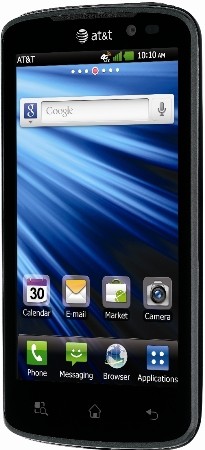
        As of yesterday, both the LG Nitro HD and Samsung Galaxy S II Skyrocket in White are available through AT&T both online and in stores. The Nitro HD is the latest Android Gingerbread smartphone from LG and features a dual-core processor as well as a namesake 720p HD display. The white Galaxy S II Skyrocket, which also features a dual-core CPU and large 4.5-inch display, brings a new color option to a handset that has already been available a few weeks now. Both handsets support AT&T’s LTE network and both will set you back $249.99 after contracts and rebates. Head over to AT&T’s site now to learn more or make a purchase.
Posted on Friday, December 30, 2011 / 0 comments / Read More

Sprint Releases Software Fix EK02 for Epic 4G Touch to Fix Loss of Signal

Sprint has finally released a software fix for the Epic 4G Touch for the dreaded loss of signal bug that’s been plaguing the community for quite some time. The bug would cause the voice and data radios to lose signal, something that was only fixable by a reboot.

It was originally believed that the bug most commonly affected those who were in bad coverage areas. Those who lose signal in bad coverage areas are supposed to be handed over to Verizon’s network until they can recover a Sprint signal, but the handoff to Verizon tends to stall and eventually the radios shut themselves down until you reboot the phone.
We’re glad that this was easily fixed through software even if it took a long time to come to fruition. Sprint also fixed the bug where your 4G hotspot connection would periodically disconnect while on a phone call. Head to this link for instructions on how to pull the update down. If you’re rooted, we’re sure your favorite ROM developer will make no delay in updating their ROMs based on this version if they haven’t already
Posted on Friday, December 30, 2011 / 0 comments / Read More

Thursday, December 29, 2011

White Galaxy S II Skyrock Landing at AT&T Dec


Dreaming of a white Christmas? How about a white Samsung Galaxy S II Skyrocket? AT&T is getting in the holiday spirit with a new deco for their LTE-enabled handset. The all-white Skyrocket doesn’t change any of the features of it’s darker counterpart, and with that pricing remains the same at $249 on a two-year contract. Just don’t go dropping this one in the snow.
Posted on Thursday, December 29, 2011 / 0 comments / Read More

Samsung Galaxy S2 Music Hub


samsung galaxy s2 music hubAn advertisement for the Samsung Galaxy S2 that mentions the technology maker’s “Music Hub” service was the subject of a consumer complaint
Samsung was recently ordered by the Advertising Standards Authority of South Africa (ASA) to withdraw an advertisement for their Galaxy S2 smartphone that punted its “Music Hub”, a feature that isn’t available to South Africans.
The advertising appeared on Samsung’s own African microsite for the device, and according to the complaint it claimed, “Samsung’s new native music player provides an intuitive playback system to search, discover, preview, purchase and download tracks on the go.”
According to the ASA ruling, Samsung’s response stated that it did not misrepresent availability of the music hub to the consumer, as the terms and conditions are provided when accessing the site.
In particular, Samsung cited that these terms stated “Samsung does not guarantee the continued availability of such content and services”.
Ruling on the matter, the ASA said that it had to determine whether or not the advertisement created a reasonable expectation that the music hub feature is accessible to the consumer.
“It is common sense to appreciate the fact that when consumers are in the market to purchase a new handset, one of the key factors they consider is the capabilities of the phone or its features,” the ASA said in its ruling.
It went on to rule that the promotion of the “music hub” application for the Galaxy S2 phone to local consumers when it is not available in the country constitutes misleading advertising.
Posted on Thursday, December 29, 2011 / 0 comments / Read More

Samsung Galaxy S2 On Three Special Offer


samsung galaxy s2 three uk deal
Three have put the Samsung Galaxy S2 on special offer which means its available at a reduced price until November 7th.
You can now pickup the Three™ Galaxy S2 for £27 a month which gets you 500 minutes, 5000 texts and 1GB of mobile data. It’s also available on other deals on Three including the One Plan which costs £35 a month and gets you 2,000 minutes , unlimited texts and unlimited mobile data. However, that’s not all because you’ll also get two months free Spotify included !
And to sweeten the deal, Three is throwing in a two-month subscription to music mavens’ steaming service of choice Spotify and a free Three pay as you go SIM for a friend
Posted on Thursday, December 29, 2011 / 0 comments / Read More
 
Copyright © 2011. Galaxy S II . All Rights Reserved
Home | Company Info | Contact Us | Privacy policy | Term of use | Widget | Site map
Design by Herdiansyah . Published by Borneo Templates