Showing posts with label Galaxy S II. Show all posts

Thursday, April 12, 2012

Smart Tools Galaxy S2 App


Measure any length or convert between any major measuring standards. You will never use another conversion tool again after using smart tools. Download smart tools.
Smart Tools
Popularity: 12% [?]
If you have enjoyed this app and want to receive galaxy s2 apps via email subscribe here.


Alternatively you can like us on facebook or follow us on twitter!
Posted on Thursday, April 12, 2012 / 0 comments / Read More

Power Galaxy S2 App


Save the battery on your galaxy s2 by using Go Power. Go Power has been developed to maximise the potential of your galaxy s2 battery life by automatically managing apps to efficiently use the battery. Download Go Power.
Go Power
Popularity: 11% [?]
If you have enjoyed this app and want to receive galaxy s2 apps via email subscribe here.


Alternatively you can like us on facebook or follow us on twitter!
Posted on Thursday, April 12, 2012 / 0 comments / Read More

Tuesday, March 13, 2012

Epic 4G Touch Samsung Galaxy S II

Samsung Galaxy S™ II, Epic™ 4G Touch fact sheet
Delivering rich content at blazing fast speeds
Samsung Epic 4G Touch1, a premium Android powered smartphone, has been designed to deliver the best multilayered entertainment experience through superior speed and display innovation. Its 3G/4G speeds, paired with one of the fastest 1.2GHz dual-core processors, the new Samsung Exynos™, give lightning fast access and downloads of movies, games, Web and thousands of applications with no buffering, lag time or disruption to your entertainment. Epic 4G Touch gives you entertainment content on the go with its ultra-thin design, large 4.52-inch touchscreen and unrivaled Super AMOLED™ Plus technology offering deeper, richer color for a bright and vivid display. Epic 4G Touch also includes an 8MP camera/camcorder with auto-focus and flash that shoots video in 1080p HD high profile with incredible detail and a 2MP, front-facing camera, perfect for self-portraits or video chat.

Productivity
· Dual-mode 3G/4G device – dependable 3G nationwide coverage and turbo-charged Sprint 4G speeds where available
· Samsung Exynos™ 1.2GHz dual-core processor
· Super AMOLED Plus 4.52-inch touchscreen
· Android™ 2.3 Gingerbread
· 3G/4G Mobile Hotspot capable, supporting up to eight Wi-Fi enabled devices on the Sprint 3G or 4G networks
· Visual Voicemail
· Enterprise functionality provides support for exchange device management policies, offers increased security of data and services and enables mobile conferencing while on the go
· MicroSD® card slot that supports up to a 32GB memory card
· Voice Talk allows users to give their Epic 4G Touch voice commands, including voice dial, text message, navigation, music, Web browsing and search
· Task Manager enables users to view and close the applications they have active and any items that have been downloaded and to check on memory usage via the Task Manager widget
· Screen capture feature allows users to easily take a screen grab of the phone screen by pressing the power button and the home key simultaneously
· Samsung's TouchWiz user interface provides superior multitasking and customization for an enhanced visual and intuitive smartphone experience
· Wi-Fi 802.11 b/g/n/a capable

Entertainment
• Dual cameras: 8MP, rear-facing camera/camcorder with auto-focus and flash that shoots HD video 1080p HD high profile and 2MP, front facing camera ideal for self-portraits or video chat
• Samsung Media Hub features thousands of new releases and top-grossing titles from major Hollywood studios and leading TV networks, including NBC Universal, Paramount, MTV, Warner Bros., CBS and FOX.
• Samsung Social Hub allows users to transfer email, instant messaging, contacts, calendar and social network connections, including Twitter, Facebook and LinkedIn accounts, into "Feeds" and "Messages" folders that can be either put into separate tabs or combined into comprehensive lists.
• Access to more than 250,000 apps through Android Market™
• GoogleTM mobile services, including Google SearchTM, Google MapsTM, Google TalkTM, GmailTM, YouTubeTM , and syncs with Google CalendarTM, as well as access to Google Goggles™ to search with pictures instead of words
• Stereo Bluetooth Wireless Technology 3.0
• Sprint applications, including Sprint Zone, Sprint TV & Movies®, Sprint Navigation and NASCAR Sprint Cup Mobile

Specifications
· Dimensions: 2.7 inches x 5.1 inches x 0.38 inches (LxWxT)
· Weight: 4.55 ounces
· Display: 4.52-inch Super AMOLDED Plus (800x480 WVGA) touchscreen
· Battery: 1800 mAh Lithium-ion battery
· Processor: Samsung Exynos™ 1.2GHz dual-core
Samsung Galaxy S II Epic 4G Touch

© 2011 Samsung Telecommunications America, LLC. Samsung, Galaxy S, Super AMOLED, Exynos and Epic are all trademarks of Samsung Electronics Co., Ltd. Screen images simulated. Appearance of phone may vary.
14G used in connection with the Samsung Galaxy S II Epic 4G Touch product name refers to the fact that the Epic 4G Touch is capable of operating on the Sprint 4G (WiMax) network.
Show full PR text 
Posted on Tuesday, March 13, 2012 / 0 comments / Read More

Friday, March 9, 2012

Android 4.0 ICS for GALAXY S II on March 10

It appears that the information wasn't that accurate, as Galaxy Note is still stuck on Android 


2.3Gingerbread. However, Samsung Galaxy S II has just been confirmed for an ICS update on 


March 10.


According to Samsung Philippines, Ice Cream Sandwich 4.0 upgrade for Galaxy S II will be 


available on March 10. 

The update can be downloaded via Kies 2.0, but users are recommended to download and 


install the latest version of Samsung's desktop sync software.

Keep in mind that Samsung Kies 1.5 does not supports upgrading to Ice Cream Sandwich. 


There's a chance that the update will be delivered FOTA in some regions, but that will require 


users to connect to a high-speed, reliable Wi-Fi network.

Samsung Philippines ICS announcement
Enlarge picture
Although the information comes through official channels, it's unusual that the

announcement was published solely by Samsung Philippines. 

In fact, they already pulled it from their site, but the folks over at  Engadget 


managed to get a screenshot which confirms the intel.

Android 4.0 Ice Cream Sandwich will bring Samsung Galaxy S II several new features, 


including Face Unlock and Android Beam. In addition, the Mobile Network Data usage function 


has been added as well.

Curiously, the update's changelog states that “because of ICS OS feature, Adobe flash and 


Bluetooth 3.0 HS” will not be supported (Bluetooth 3.0 will work).

The update requires at least 60MB through Kies, and 250MB if the update is made FOTA. This 


Ice Cream Sandwich update will only be available for Samsung GT-I9100, which means that 


carrier-bounded models will receive the update in the following weeks.
Posted on Friday, March 09, 2012 / 0 comments / Read More

Monday, January 30, 2012

Samsung to begin mass production of Exynos 5250 SoC from Q2 2012


We all have been hearing about the quadcore Exynos which might feature in the Samsung Galaxy S III, Samsung mentioned in their earnings call today that currently they are sampling the Exynos 5250 SoC and will probably start the mass production for their devices from Q2 2012 on wards if everything goes right.
The quadcore SoC from Samsung does sound great but according to me the dual-core Exynos 5250 with two Cortex – A 15 chips clocked at 2 GHz sounds more interesting and powerful. The SoC also supports  WQXGA which is a resolution of around 2560×1600. They are also saying that this beast will have four times superioe graphics compared to the Cortex A9 SoC currently available in the market. Now this really sounds very exciting.
Well we clearly have to wait for some time to see these in device, maybe in Q3 we will be seeing some Samsung tablets equipped with this  SoC, they have also mentioned that not only the tablets but also the smartphones will be featuring this powerful SoC. I am sure there will be a head on battle between Samsung and Qualcomm who will be coming up with the Krait based devices. Qualcomm had a really bad 2011, but their krait powered 2.5 GHz SoC look really great which will also be going into production around the same time. So let the battle of the beasts begin.
Posted on Monday, January 30, 2012 / 0 comments / Read More

Wednesday, January 18, 2012

Samsung Galaxy S2 WiMAX launched in Japan 20th January


Samsung has launched the Galaxy S2 with WiMAX support for KDDI au in Japan. They have already launched the LTE version in Korea and USA. This CDMA phone comes with a 4.7-inch HD (1280 x 720) Super AMOLED Plus display, 1.4GHz dual-core processor and runs on Android 2.3 (Gingerbread). It is about 9.5mm thick and weighs 139g.
Other features are same as the LTE version such as 8MP auto focus camera with LED flash, 1080p full HD video recording and a 2MP front facing video calling camera, 16GB memory, expandable up to 32GB with MicroSD, 3G, Bluetooth 3.0, WiFi a/b/g/n, aGPS, NFC (Near Field Communication) and 1850 mAh battery.
Samsung Galaxy S2 WiMAX would be available from 20th January in Japan with KDDI and the price has not been announced yet.
Posted on Wednesday, January 18, 2012 / 0 comments / Read More

How to Root I9100XXLP2_I9100OXALP2 ICS Android 4.0.3 firmware


I9100XXLP2 is leaked but stable ICS firmware for Samsung Galaxy S2(SII) I9100. Altough rooting method for almost all the S2 firmwares is same but still few readers requested for it. So lets do it in 2 mins. Read on for details.


**Rooting your device will void the warranty**
Prerequisite
Rooting your phone
  • Completely turn off your Galaxy S2 (Wait till the vibration comes)
  • Switch phone on in download mode by pressing Vol Down button + Home screen + Power on
  • Now run the odin software and and connect your phone
  • Put CF-Root-SGS2_XX_OXA_LP2-v5.2-CWM5.tar file in PDA tab as shown in pic and keep only Auto Reboot & F.Reset time checked
  • Click on start and phone will restart when it is completed
  • Well it keeps getting better by the day.
    This version can be used for daily use as stated by Dial
    I had issues with the brightness setting being hijacked many times and a tick appears in the automatic brightness box therefore making it about 50% of its selected setting
    Videos and music players closed on some occasions and ok on others
    This wont connect to Kies to restore any of your settings previously taken from Gingerbread
    My Vodafone app would not retrieve my account details.. not sure if this is a problem with Vodafone at this moment in time but it worked before i upgraded to ICS
    Apart from that and what Dial has already mentioned not working ie the signal bars etc all appears to be in good order so the final version should not be far away .... hopefully
Thats it your phone is rooted now... Enjoy
Posted on Wednesday, January 18, 2012 / 0 comments / Read More

Pink Galaxy S II Now Available for Pre-Order in the UK

UK phone seller Phones4U has a new version of the Samsung Galaxy S II up for pre-order just in time for Valentine’s Day. Why is a new version of the Galaxy S II relevant to Valentine’s Day, you ask? Because this particular variant is all done up in pink. We saw the unique look first announced for Korea back in November but this is the first time we are seeing it available for other locations. It features the same spec sheet as the original Galaxy S II including a 4.2-inch Super AMOLED Plus display and 1.2GHz dual-core CPU. The re-colored handset arrives on February 13th, just in time to pair it with a box of chocolates and hope it makes some lucky lady very happy. We’re guessing she’d prefer a diamond ring.
Posted on Wednesday, January 18, 2012 / 0 comments / Read More

Wednesday, January 11, 2012

Samsung Galaxy S User Guide


        This Samsung Galaxy S guide will help you to customize your phone and teach you how to take advantage of its best features.
Samsung Galaxy S
The Android powered Samsung Galaxy S is the first smartphone to have a large 4-inch Super AMOLED display with life-like colors. The phone comes with excellent call quality, the speed to multitask loads of applications and it is less than a centimeter thick. The Samsung Galaxy S is packed with so much stuff that you’ll always have something to play with. Here’s our Samsung Galaxy S guide that will help you to get the most out of your phone.Samsung-Galaxy-S

Customize Your Samsung Galaxy S

You can easily personalize your Samsung Galaxy S by following these instructions.

Samsung Galaxy S display
  • Open the application list in the idle mode and select ‘Settings’. Tap on the ‘Date and Time’ option to set the date and time of the device.
  • You can access the calendar by opening the application list of the device. Select ‘Calendar’ from the list and customize it according to your requirements and then hit save.
  • Select the wallpaper option in the idle mode. Tap to choose the image and select ‘set wallpaper’ or ‘save’ to set the wallpaper on your device.
  • If you want to prevent others from using your device, you can set an unlock pattern by selecting the ‘settings’ option from the application list. Then choose ‘location and security’ to ‘set unlock pattern’.
  • To access or browse your favorite pages, select ‘browser’ from the application list. This will launch the homepage, enter the web address in the URL input field and select ‘go’ to enjoy browsing from your Samsung Galaxy S.
    internet
  • To use the Bluetooth feature, open the application list; select ‘Settings’ – ‘Wireless and Network’ – ‘Bluetooth settings’. Next, turn on the Bluetooth to use this feature.
  • You can easily connect your Galaxy S with the internet, wireless hotspots and network devices via its Wi-Fi feature. Select ‘Settings’ – ‘Wireless and Network’ – ‘Wi-Fi Settings’- ‘Wi-Fi’.
  • Social Hub is a great integrated communication application for the Galaxy S for messages, emails, instant messages, calendar and contact information. To access this application select ‘Social Hub’ from the list of applications.
  • You can listen to music with the music player while on the go. The Samsung Galaxy S plays music in the following formats; MP3, MP4, M4A, 3GA, 3GP, OGG, WMA, OGA, FLAC, and ACC. Transfer the music to your device either by copying it to the memory card or by downloading it on the phone. Open the application list and choose ‘Music Player’. Follow the icons on the music player to play music.
  • You can even listen to news and music with the FM Radio. Select ‘FM Radio’ from the application list and turn on the radio. The FM radio automatically scans and saves stations.
    FM radio
  • To adjust the volume of the ringtone, press the volume key located on the left side of the phone.

BatteryBasic Features

The Samsung Galaxy S has few hardware controls. To turn on the device, press and hold the power button that is located on the right hand side of the phone. Most of the functions of the Samsung Galaxy S are performed through its touch screen. To turn on the touch screen, press the Home key. The touch screen automatically gets turned off if you do not use the device for a specified period. The Samsung Galaxy S touch screen can be locked or unlocked by pressing the power button.
The phone features a virtual keyboard that’s easy to use. You can even choose the keyboard type from Swype or Samsung keypad options. Select Phone – Keypad – Input method.
galaxy-s-swype
Below the display are three hardware buttons: Menu, Home and Back button. The menu key launches the search field and the home key starts the task switcher.
The Samsung Galaxy S is equipped with a 1500 mAh battery that provides 13 hours of 2G talk time and 6 hours of 3G talk time. The device has a great battery that will exceed your expectations. You can easily use it for 2 days without charging it. The Samsung Galaxy S also displays the battery availability for various functions and it restricts your functions, if the battery is low.
samsung galaxy s battery via GSMarena
However the following suggestions will help you save the battery of your smartphone.
  • Lower the brightness of the mobile phone to save battery.
  • Set the ‘Screen Timeout’ option to 15 seconds when the screen is idle.
  • Keep the phone on flight mode in areas where there is no connection or when you don’t want to make and receive calls.
  • Restrict your network settings to 2G, when you don’t need the 3G connectivity.
  • GPS drains the battery, so disable it when not in use.
  • Activate the default power saving option that automatically functions to save battery.
Posted on Wednesday, January 11, 2012 / 0 comments / Read More

No Wand Needed for these Tricks & Tips for Samsung Galaxy S II


You have the most awesome phone and are now a bit stuck to know what to do with it? There are so many neat things it can do that are hidden beneath that tough Gorilla glass exterior, from the cool to the useful, right through to the essential, follow us on our nifty time-saving journey.

Scratch the Surface

You'll have no doubt noticed when you got your phone that the back cover is a little flimsy -- or even cheap looking if we're being honest. So the first thing to do is to whack a case on it -- covers up the awful back as well as protecting your phone. I personally wouldn't bother with a screen protector for two reasons: one, the display is so lush I don't want anything getting in the way of it; two, it's really not that necessary as the Gorilla glass screen is pretty darn tough and resists scratches well.
This is just common sense stuff though, you want to get stuck in with the neat stuff your phone can do. No problem! Samsung Galaxy S2 tips and tricks coming right up...

Customize with Grids

grids
One of the coolest things about the S2 home screens is that the TouchWiz UI allows you to customize your widgets and pictures according to grids, so you don't necessarily have to have them at the size they are right now -- this depends on the widget to a certain extent so you'll need to have a play around to see what suits you. It's definitely useful for pictures and the like as you can make sure they fit neatly on your home screen with no spare space.
It's a bit tricky to begin with as you need to medium press the relevant image to get the grid up -- that is longer than a tap but less than a long press. You then get presented with the grid that you can move around to the size and shape you like (provided there's enough space of course)

Have a Tidy Up - Folders & Shortcuts
If your phone came loaded with many preinstalled apps that you don't know what to do with, or you have an appdiction, then very
folders
quickly your phone will be covered with more icons than you can handle. Make use of folders and organize your screens according to games, social, or whatever else you have to categorize. You have two options:
  • From the applications screen tap the menu icon followed by edit, and hold down "add folder", you can then slide your empty folder to wherever you wish.
  • Long press on an empty space on one of your home screens, underneath you get a good few options, one of which is "new folder". You can then name your folder accordingly.
Just slide whatever apps you want into the relevant folders.
There are three shortcuts that are always on the screen whether you're in applications or your home screen -- Phone, Contacts, Messaging -- although these are useful and you may not want to get rid of them, you can do so if you wish.
  • Tap menu followed by edit and you'll see a white corner around the top left of each shortcut. Then you just need to find what you want to replace them with and slide them into place. Or just get rid of it and slide it somewhere into your apps so it's still there but not always on your screen if you don't want it.

Stay Safe Out There - Antivirus & Security

lookout
With hot new tech, come those who will try to benefit from it and unfortunately malware and viruses are something you need to protect your phone from, just as much as you would do with your computer. That isn't the only threat though, being such a luscious device means theft is a real issue too. There is some great anti-virus and security software for Android and many address the two issues in one.
I like Lookout Mobile as there is a free option which scans everything I download, as well as being able to locate my phone should it become lost or stolen. There are plenty of other options though, depending on what's important to you and how much you want to spend.

Are You Battering the Battery?

batterymonitor
Of course the S2 isn't unique in the smartphone world when it comes to frequency of charging -- it's a common complaint of almost any smartphone you care to mention. However, what with the dual-core processor, and Super AMOLED Plus display to power, battery juice is going to be something you are concerned about. Here are some easy things you can do to preserve that battery life:
  • Get yourself a battery monitor app or widget and put it on one of your home screens for quick access. Not only will it give you an accurate picture of how much battery life you've got left, it can also run tests to see how your battery is running, and most interestingly will bring up the percentages to show how much certain apps and functions are draining your battery.
  • Turn off Wi-Fi, data and GPS when you aren't using them.
  • The screen display of the S2 is of superb quality, and one of the reasons for this is that it doesn't work in the conventional way, in that it doesn't use a backlight. In fact it will only illuminate a pixel if it needs to be illuminated, so if something should be black, it will be black as black, as those pixels won't be turned on at all. Therefore, if you have a wallpaper or widgets with a larger portion of black in them, then the battery used for the display will be minimized. Of course you don't want a dull, dark screen, but I have a live moon phase wallpaper which looks amazing, but doesn't use up nearly as much battery as others.
  • Get the program manager widget on your home screen to shut down apps quickly when you aren't using them.

Time Saving Tricks

That's the big stuff organized, now check out these quick and useful Samsung Galaxy S II tips and tricks to help you save time -- they're pretty neat.
  • For sending messages and emails make sure you use the Swype keyboard. You just need to trace a path through the letters of a word rather than trying to hit each individual key -- it has a predictive element too so is quite forgiving if you don't quite catch a letter as you're tracing. You don't even have to hit the space bar as Swype will recognize the end of one word and the start of a next. To make sure the Swype keyboard is activated, long press on the Swype key on the bottom left corner of the keyboard to choose your input method.
  • Send messages and make calls quickly. Tap on contacts, find your contact of choice and swipe them to the left to message, or to the right to call.
  • Long pressing the power button brings up a quick menu to quickly disable/enable data connection, as well as turn silent mode and flight mode on and off.
  • Pull your finger down from the very top of the screen for a pull down menu to turn off Wi-Fi, GPS, Bluetooth, and access Sound and Auto rotation settings -- much quicker than going through the settings.
Android is such a versatile system, there are loads more ways of getting more out of your Galaxy S2, but we've covered the best ones here. If you have a tip for us that we've missed, please let us know.
Posted on Wednesday, January 11, 2012 / 0 comments / Read More

Friday, December 30, 2011

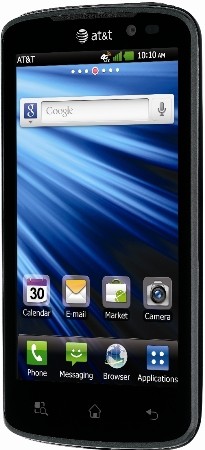
LG Nitro HD, White Galaxy S II Skyrocket Now Available at AT&T


        As of yesterday, both the LG Nitro HD and Samsung Galaxy S II Skyrocket in White are available through AT&T both online and in stores. The Nitro HD is the latest Android Gingerbread smartphone from LG and features a dual-core processor as well as a namesake 720p HD display. The white Galaxy S II Skyrocket, which also features a dual-core CPU and large 4.5-inch display, brings a new color option to a handset that has already been available a few weeks now. Both handsets support AT&T’s LTE network and both will set you back $249.99 after contracts and rebates. Head over to AT&T’s site now to learn more or make a purchase.
Posted on Friday, December 30, 2011 / 0 comments / Read More

Sprint Releases Software Fix EK02 for Epic 4G Touch to Fix Loss of Signal

Sprint has finally released a software fix for the Epic 4G Touch for the dreaded loss of signal bug that’s been plaguing the community for quite some time. The bug would cause the voice and data radios to lose signal, something that was only fixable by a reboot.

It was originally believed that the bug most commonly affected those who were in bad coverage areas. Those who lose signal in bad coverage areas are supposed to be handed over to Verizon’s network until they can recover a Sprint signal, but the handoff to Verizon tends to stall and eventually the radios shut themselves down until you reboot the phone.
We’re glad that this was easily fixed through software even if it took a long time to come to fruition. Sprint also fixed the bug where your 4G hotspot connection would periodically disconnect while on a phone call. Head to this link for instructions on how to pull the update down. If you’re rooted, we’re sure your favorite ROM developer will make no delay in updating their ROMs based on this version if they haven’t already
Posted on Friday, December 30, 2011 / 0 comments / Read More

Thursday, December 29, 2011

White Galaxy S II Skyrock Landing at AT&T Dec


Dreaming of a white Christmas? How about a white Samsung Galaxy S II Skyrocket? AT&T is getting in the holiday spirit with a new deco for their LTE-enabled handset. The all-white Skyrocket doesn’t change any of the features of it’s darker counterpart, and with that pricing remains the same at $249 on a two-year contract. Just don’t go dropping this one in the snow.
Posted on Thursday, December 29, 2011 / 0 comments / Read More

Samsung Galaxy S2 Music Hub


samsung galaxy s2 music hubAn advertisement for the Samsung Galaxy S2 that mentions the technology maker’s “Music Hub” service was the subject of a consumer complaint
Samsung was recently ordered by the Advertising Standards Authority of South Africa (ASA) to withdraw an advertisement for their Galaxy S2 smartphone that punted its “Music Hub”, a feature that isn’t available to South Africans.
The advertising appeared on Samsung’s own African microsite for the device, and according to the complaint it claimed, “Samsung’s new native music player provides an intuitive playback system to search, discover, preview, purchase and download tracks on the go.”
According to the ASA ruling, Samsung’s response stated that it did not misrepresent availability of the music hub to the consumer, as the terms and conditions are provided when accessing the site.
In particular, Samsung cited that these terms stated “Samsung does not guarantee the continued availability of such content and services”.
Ruling on the matter, the ASA said that it had to determine whether or not the advertisement created a reasonable expectation that the music hub feature is accessible to the consumer.
“It is common sense to appreciate the fact that when consumers are in the market to purchase a new handset, one of the key factors they consider is the capabilities of the phone or its features,” the ASA said in its ruling.
It went on to rule that the promotion of the “music hub” application for the Galaxy S2 phone to local consumers when it is not available in the country constitutes misleading advertising.
Posted on Thursday, December 29, 2011 / 0 comments / Read More

Samsung Galaxy S2 On Three Special Offer


samsung galaxy s2 three uk deal
Three have put the Samsung Galaxy S2 on special offer which means its available at a reduced price until November 7th.
You can now pickup the Three™ Galaxy S2 for £27 a month which gets you 500 minutes, 5000 texts and 1GB of mobile data. It’s also available on other deals on Three including the One Plan which costs £35 a month and gets you 2,000 minutes , unlimited texts and unlimited mobile data. However, that’s not all because you’ll also get two months free Spotify included !
And to sweeten the deal, Three is throwing in a two-month subscription to music mavens’ steaming service of choice Spotify and a free Three pay as you go SIM for a friend
Posted on Thursday, December 29, 2011 / 0 comments / Read More

Samsung Galaxy S2 Skyrocket LTE 4G Unveiled by AT&T


Samsung Galaxy s2 Skyrocket ATT
AT&T has finally announced its plans to release its first two LTE smartphones that includes the launches of the HTC Vivid and the Samsung Galaxy S2 Skyrocket, whose “Skyrocket” moniker is probably in reference to how fast LTE connections are.
In terms of hardware specs, the Samsung Galaxy S2 Skyrocket will sport a 1.5GHz dual-core processor, which is an increase over the regular Galaxy S2’s 1.2GHz dual-core Exynos processor. It will also see an increase in screen size from 4.3” to 4.5” (800×480) and it too will be featuring Samsung’s Super AMOLED Plus display.
Samsung Galaxy S2 Skyrocket  will run on Gingerbread OS and match T-Mobile’s version with a 1.5GHz dual-core processor along with an 8-megapixel camera capable of filming 1080p HD video. It also includes a 2-megapixel front-facing camera with 16GB of internal storage and a microSD card slot.
Price
Samsung Galaxy S2 Skyrocket will set you back $249 on a two year contract along with AT&T’s LTE data plans.
Posted on Thursday, December 29, 2011 / 0 comments / Read More

Thursday, December 22, 2011

Default Apps and Tools installed on the Galaxy S2

In this post I'll be making a list of all the applications that come pre-installed on the Samsung Galaxy S2 (well, in South Africa at least).

There are quite a few, and I haven't even used them all, but as I go along, I'll amend this post to talk about the details and inner workings of each of the standard installed apps. Here are the screen shots of my first three app pages:


On the thirds screen shot, the default apps stop at "Drive & Walk".

Anyway, let's get started - on Page 1 you have the following (Note - some of the apps I have already reviewed, so look out for the links to each):

  • Clock (read about the Clock's features)
  • Calendar
  • Music
  • Internet
  • Camera (I have covered this in great details already, see the posts: Shot taken at night with the flash, A full HD movie of the dogs snoozing, All the features and settings of the Camera, More full HD movie clips and A few photos taken with the Galaxy S2 Camera)
  • Maps
  • Email
  • Gmail
  • Gallery
  • Google Search
  • Market
  • Settings
  • Social Hub
  • Music Hub
  • Readers Hub (Consists out of three parts, Newspapers, Books and Magazines)
  • Game Hub
Page 2 has:
  • My files
  • Videos
  • AllShare (this one is tricky to get to work properly, but I've written a Guide on how to get AllShare to work on the Galaxy S2)
  • Kies air
  • Talk
  • Latitude
  • Task
  • Navigation
  • Voice commands
  • Voice recorder
  • Voice talk
  • Voice search
  • Places
  • Downloads
  • Photo editor (I looked at this one on this page)
  • Video maker
And on Page 3:
  • Mini diary
  • Calculator (read what I had to say about it here)
  • Samsung Apps
  • News & Weather
  • Task Manager
  • FM radio
  • IM
  • Memo (I looked at this one here, but got a better alternative to it)
  • Polaris Office
There you have it, quite a lot of default apps pre-installed on the Galaxy S2. As I have a look at all of these, I'll amend this post by adding the links to each relevant post.

Also, if I remember correctly, Kies air isn't installed by default - this only gets installed when you connect the phone to your pc with Kies installed. After syncing, the app should appear in your list.

Feel free to leave a comment if your phone doesn't include all of the above, or even if some of the apps are not. Would like to know what the rest of the world is experiencing :)

Cheers for now!
Posted on Thursday, December 22, 2011 / 1 comments / Read More
 
Copyright © 2011. Galaxy S II . All Rights Reserved
Home | Company Info | Contact Us | Privacy policy | Term of use | Widget | Site map
Design by Herdiansyah . Published by Borneo Templates